Choosing a format · 3 min read
Launch Site or Explorable 3D World? How to Choose
Compare an interactive game launch website with an explorable 3D world. Choose a format around the visitor's goal, available assets and launch scope.
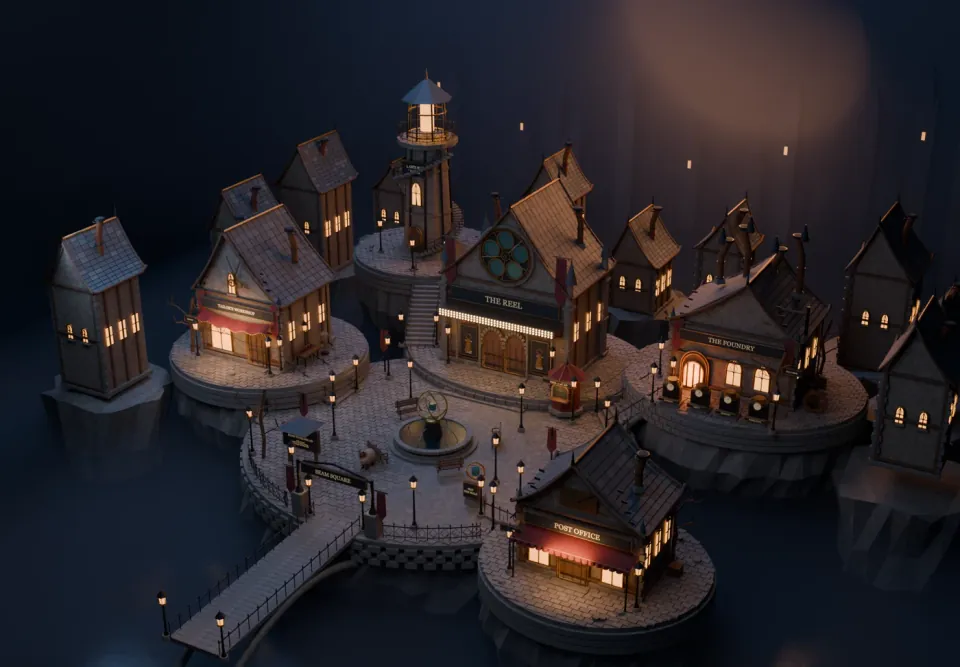
An interactive game website and an explorable 3D world can share an art direction while asking very different things of a visitor. One guides a reader through a page. The other asks someone to navigate a place. Choosing between them starts with the experience you want to offer, rather than the technology you want to show.
Write down the visitor's main task in one sentence. If it is understanding a new game and reaching its trailer or store page, a focused launch site is often the practical starting point. If discovering characters, exhibits or locations is itself the attraction, exploration may earn its place.
Choose a launch site for a direct introduction
A launch site can combine a strong opening image, a trailer, screenshots, a few useful features and a clear call to action. Selected animation can reveal the world as someone scrolls while keeping the essential information available in a familiar format. Visitors do not need to learn movement controls before they can act.
This suits announcements, demos and releases where the message needs to land quickly. It can also be expanded over time. A character feature or a single interactive model can be added later if it gives visitors something meaningful to discover. You do not need to commit to a whole environment at the first stage.
Choose a world when its places have jobs
Exploration works best when destinations reward the effort of reaching them. In After Hours, the Backlot presents film work, the Foundry explores asset development, the Casting House introduces characters and the Post Office connects visitors to an inquiry. The locations give the route a purpose beyond looking around.
This is Twined's own studio project, not a claim that every game needs a city. A smaller commission could use one room or a short route with a few deliberate interactions. Before building, ask what a visitor gains by moving through the environment that a page, gallery or video would not provide as clearly.
Budget for the whole experience
A 3D brief includes more than models and textures. Someone must prepare assets, define navigation, implement interactions, handle camera movement, plan loading and test the result on the intended devices. Additional characters may introduce rigging and animation work. A supplied game asset may still need substantial preparation for a browser.
Keep the important information reachable through ordinary pages too. A visitor on a limited device or a slow connection should still be able to understand the game and follow its store link. Plan that route at the same time as the environment, rather than treating it as a fallback to invent at the end.
Compare two written scopes before deciding: the smallest page that serves the launch and the smallest world that provides a worthwhile discovery. Include the assets, review stages and supported devices in each. That makes the choice about the value of the experience and the work needed to deliver it.